
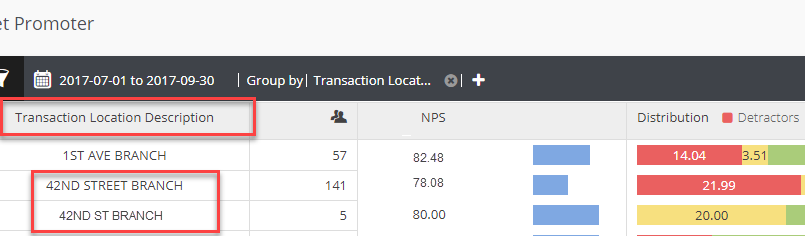
Sometimes when viewing data in Analytics you may come across a branch or agent name that shows up twice. As shown in the screenshot below.
These fields comes to us on your data file, and if the spelling/case of the name comes over on one file spelled one way then spelled differently on another file then this will create duplicate records such as in the example shown below. This can happen with any of the fields in your data file. The spelling, case and punctuation must match exactly or duplicate records will be created. (For example, it can be something as simple as Main St. and Main St (with no period after St).
Sometimes you may simply want to change the way a field is displaying in your reports, and this is perfectly fine!
If a duplicate is noticed, or if a decision is made to change the way one of the fields is reporting, please reach out to your credit union's Program Manager or to the MLG Support Team. We will update all historical records to show under the requested name.
If a ticket is opened with MLG Support, it will help to have the following information:
- What are the duplicate names
- Which of the duplicate names do you want to keep (we will merge all historical records under this name)
- Do we need to change ALL historical records or only back to a certain date?
Once all historical records have been merged then you just the spelling you wish to keep will be in your Analytics reports.
Comments
0 comments
Please sign in to leave a comment.